|
|||||||||||||||||
|
Hi there, on this page you will discover more details on how to subscribe to EPE Online and the tools you'll need to be able to read the magazine, plus other frequently asked questions. Topics covered on this page are:
Adobe Acrobat Reader EPE Online is presented in Adobe Acrobat PDF format. If you don't already have Acrobat Reader (7.0 or higher on your system), click the icon to the right to visit Adobe's pages at www.adobe.com where you can download a FREE copy. Supported Platforms EPE Online can be read on any computer that supports Adobe Acrobat Reader 7.0 or higher. This includes Windows 2000, ME, XP, and NT; also UNIX, Linux, and Macs. The key point is that each issue is delivered as a Adobe PDF file, and it's your responsibility to ensure that you have access to an appropriate utilities on your computer before you purchase the magazine. Download Problems (can't open PDF file) The PDF file for an issue of EPE Online can be quite large. Depending on where you are in the world and on the quality of your internet connection, downloading an issue can take some time. Even worse, if there's a "glitch" in the internet that breaks your connection, you may end up with only a portion of the PDF file. You may have to download the issue again.
Download Problems (can't see current issue) If when you go to the download page you can't see the current issue, it may be because your browser is remembering/looking at a cached (old) page. In this case, please try the following:
Instructions for Clearing your Browser's Cache To clear the memory caches in NETSCAPE Communicator (Netscape 4):
To clear your temporary files in INTERNET EXPLORER 4:
To clear your temporary files in INTERNET EXPLORER 7
To clear your temporary files in AOL:
Subscribing to EPE Online If you are a first-time subscriber, when you click the Subscribe link on our Home Page, amongst other things you will see a dialog that allows you to purchase a 12-month subscription that commences with the current issue, the current issue on its own, or individual back issues. Click the one year subscription box and/or any back issue boxes, then click the "Buy EPE Online" button. This will take you to a new page where you can purchase your subscription online by credit card (Visa or Mastercard). If you don't have a credit card or if you don't wish to subscribe online, you can purchase a subscription by Fax or by sending us a Check or Money Order. As soon as you've completed your purchase, you'll be able to Download the appropriate issues to your computer. (Note that when you purchase a 12-month subscription, only the current month will initially be available - we'll inform you by email when subsequent issues are posted each month).
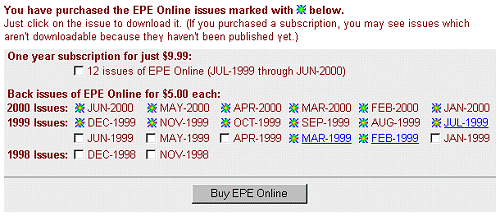
Downloading and Reading EPE Online As soon as you've purchased a 12-month subscription or any back issues, you'll be presented with an account number and password, along with the opportunity to immediately download these issues to your computer (more on this in a moment). Alternatively, you may wish to download these issues at a later date (especially in the case of future issues in a 12-month subscription). In this case, when you click the "Download" link on our Home Page, you will either be taken directly to the download page or, in certain cases, you will be presented with a dialog that asks you to enter your account number and password. When you enter your account number and password, you'll be taken to the same download page that you were presented with when you first purchased these issues. The active hyperlinks on this page reflect the issues you can download at this time, while the white boxes indicate other issues that are available for you to purchase if you wish. (Note that the issues that are marked as purchased but don't have active links indicate those issues in a 12-month subscription that haven't been published yet).
We suggest that you create a directory called "EPE Online" somewhere on your system.
To view your issue in your browser, click here. This will open a PDF window and the magazine will begin to load into the window ( we suggest you do not interact with the magazine until it loads completely – may take up to 5 mins depending on your connection (Note: it may also appear to lock your browser until it is fully loaded).
Remember you are responsible for downloading, saving, and backing up your issues.
Faxing your order or paying by check or money order If you don't have a credit card or if you don't wish to subscribe online, you can purchase a subscription by fax or by sending us an international check or money (in US funds). In either case all, you have to do is to print out the attached Order Form, fill it in, and either fax it to us (with your credit card details) or post it to us (with your check or money order). Please note that it's VERY IMPORTANT that you provide us with an ACCURATE email address so that we can email you back your EPE Online account number and password.
Terms and Conditions Upon purchasing an issue of EPE Online, you are granted permission to download that issue to one or more computers for your personal use. You are also granted permission to read the magazine on your computer and/or to print out a single copy for your personal use. EPE Online is copyrighted material, and you may not email any portion of the magazine to any other person. Nor may you post any portion on a Web site or bulletin board, or otherwise distribute any portion of the magazine. Please note that we will prosecute any copyright infractions to the fullest extent of the law.
|
 |
|||||||||||||||
Copyright © 1998-2007, TechBites Interactive Inc., All rights reserved. This site is powered by techbites. |
|||||||||||||||||