|
|
|
Hi there, on this page you will discover more details on how to subscribe to EPE Online and the tools you'll need to be able to read the magazine, plus other frequently asked questions. (If you have any questions or problems that aren't covered here, please email us at )
Topics covered on this page are: |
|
|
| Adobe Acrobat Reader |
| EPE Online is presented in Adobe Acrobat PDF format. If you don't already have Acrobat Reader (3.0 or higher on your system), click the icon to the right to visit Adobe's pages at www.adobe.com from whence you can download a FREE copy. | |
|
|
| Download Problems (can't see current issue) |
|
If when you go to the download page you can't see the current issue, it may be because your browser is remembering/looking at a cached (old) page. In this case, please try the following: o) Go to epemag.com and click on the "Download" link then right-mouse click in the main window and select the refresh option -- then see if you can see the latest issue. o) If the above doesn't work, then go to some other web site (any other web site), clear your browser's cache (see the instructions below), exit/close the browser, start the browser up again, and see if you can see the latest issue. o) If the above doesn't work, enter the following URL into your browser: https://ssl-064.imconline.net/epemag/buy_mag2.asp?Go=Logout This will force the system to go to the page for you to login. So login again using your EPE Online account number and password (the ones you were given when you first subscribed). o) If the above doesn't work, try using another browser (if you're using IE, try Netscape, and vice versa) o) If you still can't see the current issue, please email us at and we'll see what we can do to sort it out. --------- Instructions for clearing your browser's cache follow ---------- To clear the memory caches in NETSCAPE Communicator (Netscape 4): |
|
|
| Subscribing to EPE Online |
|
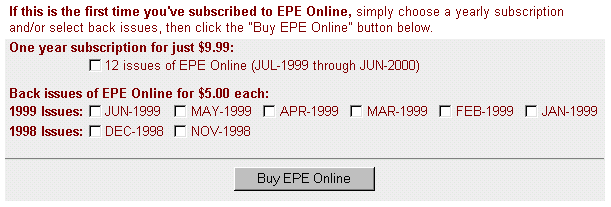
If you are a first-time subscriber, then when you click the Subscribe link on our Home Page, amongst other things you will see a dialog that looks something like the following (of course the starting month of a 12-month subscription and the available back issues will be updated every time a new issue becomes available):
All you have to do is to click the one year subscription box and/or any back issue boxes, then click the "Buy EPE Online" button. This will take you to a new page where you can purchase your subscription online by credit card (Visa or Mastercard). If you don't have a credit card or if you don't wish to subscribe online, you can purchase a subscription by Fax or by sending us a Check or Money Order. As soon as you've completed your purchase, you'll be able to Download the appropriate issues to your computer. (Note that when you purchase a 12-month subscription, only the current month will initially be available -- we'll inform you by email when subsequent issues are posted each month). |
|
|
| Downloading and Reading EPE Online |
|
As soon as you've purchased a 12-month subscription or any back issues, you'll be presented with an account number and password, along with the opportunity to immediately download these issues to your computer (more on this in a moment). Alternatively, you may wish to download these issues at a later date (especially in the case of future issues in a 12-month subscription). In this case, when you click the Download link on our Home Page, amongst other things you will see the following dialog:
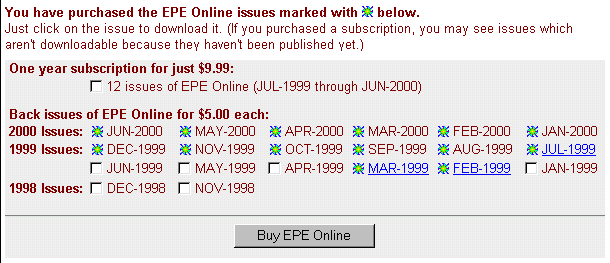
When you enter your account number and password, you'll be taken to the same download page that you were presented with when you first purchase these issues. Depending on which issues you've purchased, this will look something like the dialog shown below (once again, the starting month of a 12-month subscription and the available back issues will be updated every time a new issue becomes available):
The active hyperlinks reflect the issues you can download at this time, while the white boxes indicate other issues that are available for you to purchase if you wish. (Note that the issues that are marked as purchased but don't have active links indicate those issues in a 12-month subscription that haven't been published yet). We suggest that you create a directory called "EPE Online" somewhere on your system. Underneath this directory, we suggest that you create a subdirectory for each issue. For example, in the case of the March 1999 issue, you could create a sub-directory called ... wait for it ... "March 1999" Clicking on one of the active links will cause a ZIP (compressed) file for that month to be downloaded to your computer. The name of this file will be composed of the first three letters of the month and the last two digits of the year. For example, the file associated with the March 1999 issue will be called "MAR99.ZIP" You would first download this file into your "March 1999" directory and then un-ZIP it (note that you will need an appropriate un-ZIP utility as described in the Supported Platforms and Zip Files section elsewhere on this page). Unzipping the compressed file will result in a suite of Adobe Acrobat PDF files (you will need a copy of Adobe Acrobat Reader installed on your system as discussed in the Adobe Acrobat Reader section elsewhere on this page). The name of the main PDF file associated with each issue is composed of the first three letters of the month and the last two digits of the year (for example, the file associated with the March 1999 issue will be called "MAR99.PDF"). Double-clicking on this file will launch the Adobe Acrobat Reader on your system, which will allow you to read this issue and print it out. |
|
|
| Faxing your order or paying by check or money order |
|
If you don't have a credit card or if you don't wish to subscribe online, you can purchase a subscription by fax or by sending us an international check or money (in US funds).
In either case all, you have to do is to print out the attached Order Form, fill it in, and either fax it to us (with your credit card details) or post it to us (with your check or money order). Please note that it's VERY IMPORTANT that you provide us with an ACCURATE email address so that we can email you back your EPE Online account number and password. |
| Copyright & Contact Info |
Return to the EPE Online home page! |